Share this article:

Blog
Jan 13, 20235 min read

Atomic design methodology

Stefani Tashkova

Junior Developer

Atomic design methodology

Atomic design methodology

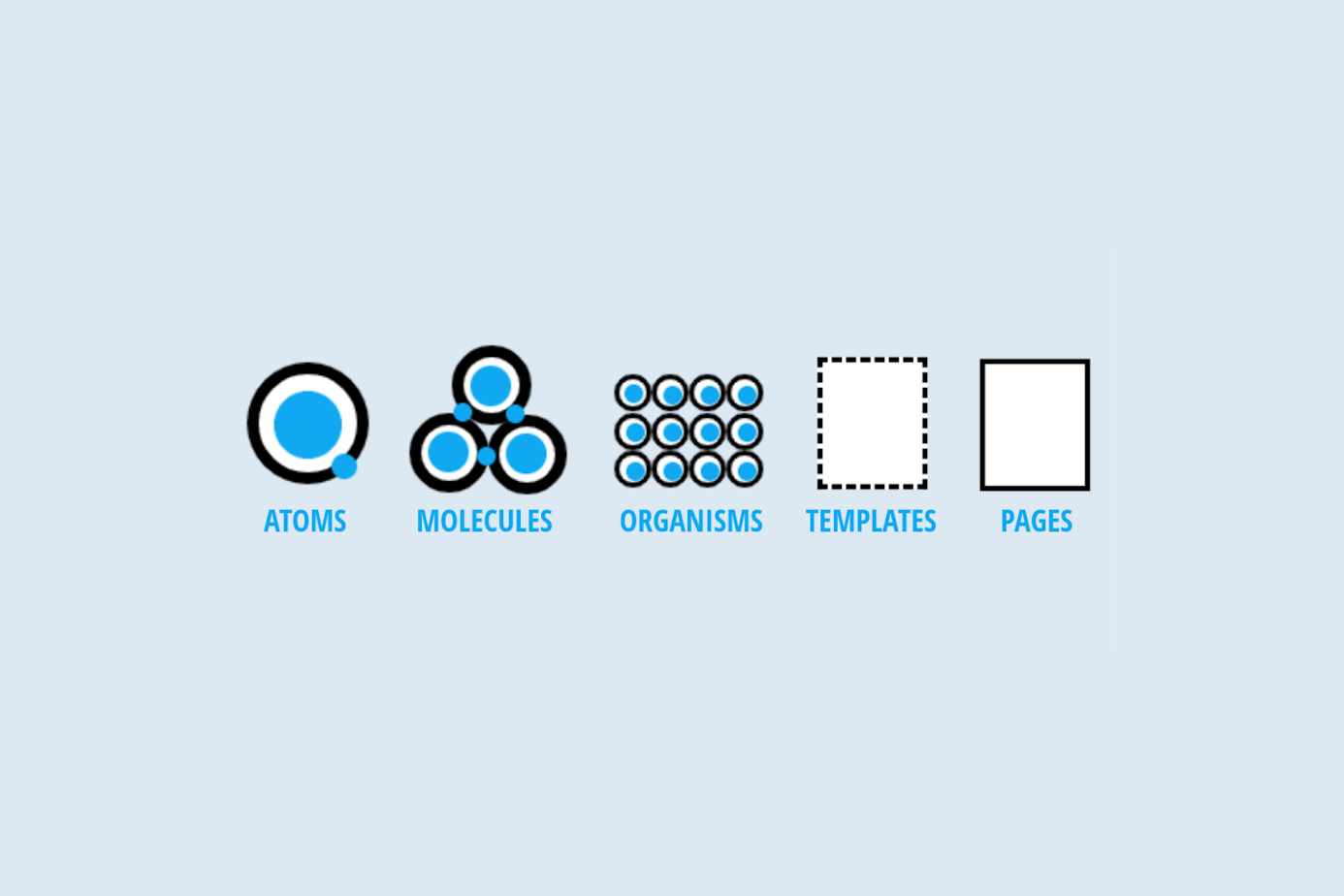
Atomic design is a methodology for developing design systems. It was created by Brad Frost, and the main concept is that "atoms", which are the basic building blocks are grouped together to form "molecules" which then are combined in "organisms" and so on, until a complete design system is formed.

The goal of the atomic design is to disassemble complex design systems into simpler, more comprehensible units that can be reused. Designers may build scalable and consistent design systems that are simple to maintain and update by starting with fundamental building blocks (atoms) and progressively moving up to more sophisticated components (organisms).

The five stages of the atomic design methodology are combined in order to provide interface design systems in a more thoughtful and hierarchical way. There are five phases in atomic design:

  • Atoms
  • Molecules
  • Organisms
  • Templates
  • Pages

Atomic design stages

All of the user interfaces are made up of fundamental building pieces known as atoms. These atoms can be basic HTML elements like form labels, buttons, inputs, icons and others that can’t be broken down any further without losing their functional purpose.

atoms

When connecting our atoms we can create a molecule and simple UI components. For instance, a search form molecule can be created by combining a form label, a search input, and a button. The input atom is now defined by the label atom. The form is now submitted when you click the button atom. The outcome is a straightforward, adaptable, and reusable component that can be added anywhere search capability is required.moleculesOrganisms are slightly more complicated UI elements made out of collections of molecules, atoms, or other organisms. These organisms build up separate parts of the interface.

Let's put the search form molecule in the context of a header organism since the search form is frequently present in the header of many websites. Both similar and dissimilar types of molecules can make up an organism. A logo image, a navigation list, and a search form are examples of several components that can make up a header organism.

organisms

While some organisms might be made up of several kinds of molecules, others might be made up of the same repeatable molecules. For instance, practically any e-commerce website's category page will include a list of products presented in the style of a grid.

Now that our design system has organisms defined, we can use all these elements to create something that looks like a web page!

templates

Templates are page-level objects that organise elements into a layout and specify the underlying content hierarchy of the design.

Instead of the page's actual content, templates are responsible for the page's underlying content structure. The homepage template example shown below illustrates how all the required page elements work together to give context for these abstract molecules and organisms.

pages

Putting real content into templates, creating different variants to present the final UI and evaluate the flexibility of the design system is exactly what pages are. Using the homepage design as a foundation, we can add representative text, photos, and media to demonstrate real content.

Pages help with testing the effectiveness of the underlying design system. We can examine how all those patterns hold up when actual content is applied to the design system at page level. Does everything work properly and look great?

Atomic design advantages in front-end development

Because anatomic design enables separating huge informational chunks into smaller ones so they may be reused wherever they are required in our app's interface, it is ideal for use with React, Angular or other frameworks. By doing so, we may prevent duplicating code, which might make things harder to handle in the future.

The ability to construct reusable components that can be reused repeatedly without needing to be rewritten each time is one of the main advantages of adopting atomic design when creating React apps.

Another advantage of using atomic design for React development projects is easier maintenance because this approach enables you to concentrate on each component independently rather than worrying about the entire site at once. Atomic design allows developers to concentrate on creating individual parts without worrying about how they will integrate into a larger design strategy. In consequence, this facilitates developers' ability to work independently on various components of an application or website. Atomic Design allows us to create many different products from the same set of building blocks, which makes the work more efficient and gives more flexibility.

Atomic design examples

Here we can see some examples of design systems based on anatomic approach:

Atomic design tools

We can easily create our anatomic design system with one of those suggested tools.

For more information, you can visit https://atomicdesign.bradfrost.com/chapter-2/

Share this article:
Related Blog Articles

    AI in service of democracy: how we built zakogo.com

    Blog

    AI in service of democracy: how we built zakogo.com

    The story behind zakogo.com — a free, non-commercial platform helping Bulgarian voters compare party platforms ahead of the April 19 elections.

    Written by Vasil Boychev
    Apr 14, 20263 min read
    Why startups hesitate to work with a bespoke software development agency – and how we address every concern

    Blog

    Why startups hesitate to work with a bespoke software development agency – and how we address every concern

    Startups often hesitate to work with software agencies due to concerns over cost, control, and flexibility. Discover how Bulcode’s bespoke software solutions address each challenge, ensuring growth and agility.

    Written by Svetoslava Angelova
    Nov 05, 20245 min read
    Navigating IT staff augmentation: Addressing the challenges head-on

    Blog

    Navigating IT staff augmentation: Addressing the challenges head-on

    Explore the complexities of IT staff augmentation, from tackling skill shortages to fostering effective communication across diverse teams. Discover strategic solutions to enhance integration, bridge skill gaps, and align projects with overarching business objectives.

    Written by Mihail Shahov
    Mar 18, 20245 min read
    Building a high-performing Agile team: Our proven approach

    Blog

    Building a high-performing Agile team: Our proven approach

    Discover how we build high-performing Agile teams by defining clear roles, fostering collaboration, and using flexible tools.

    Written by Svetoslava Angelova
    Aug 27, 20248 min read
    Single Directory Components in Drupal core: A comprehensive overview

    Blog

    Single Directory Components in Drupal core: A comprehensive overview

    Explore how Single Directory Components (SDC) in Drupal Core streamline the development process by encapsulating component-related files into a single directory. Learn about the benefits of SDCs and follow a step-by-step guide to implement them in your Drupal projects.

    Written by Nikolay Tsekov
    Aug 07, 20244 min read
    Drupal 11: What to expect? Comprehensive guide to new features and enhancements

    Blog

    Drupal 11: What to expect? Comprehensive guide to new features and enhancements

    Drupal 11 is out! In this article, discover it's exciting features and improvements. Upgrade now to redefine your digital strategy with Bulcode's expert support.

    Written by Svetoslava Angelova
    Aug 05, 20247 min read
    Controlled Agile: Striking the perfect balance in hybrid project management

    Blog

    Controlled Agile: Striking the perfect balance in hybrid project management

    Controlled Agile, a fusion of traditional project management and agile methodologies, emerges as a pivotal strategy in software development, balancing predictability and adaptability.

    Written by Mihail Shahov
    Mar 19, 20247 min read
    Unveiling the power duo: Next.js as the Headless frontend of Drupal 10

    Blog

    Unveiling the power duo: Next.js as the Headless frontend of Drupal 10

    Discover the dynamic synergy between Drupal 10 and Next.js, as this powerful combination reshapes the landscape of web development. Next.js, an open-source React-based framework, is seamlessly integrated as the headless frontend of Drupal 10, offering a plethora of benefits. From enhanced performance with features like automatic code splitting and server-side rendering to flexible design and SEO-friendly capabilities, this collaboration empowers developers to create high-performing, scalable, and visually appealing web applications. The efficient content management of Drupal 10 coupled with Next.js' adaptability to trends ensures a cutting-edge development approach, positioning this tandem at the forefront of modern web development practices. Embrace the future with the Drupal 10 and Next.js combination, redefining how we approach and craft dynamic online experiences.

    Written by Todor Kolev
    Feb 07, 20245 min read
     Exploring the Drupal community: Resources, support, and documentation

    Blog

    Exploring the Drupal community: Resources, support, and documentation

    Discover the vibrant Drupal community and unlock the potential of this powerful CMS! Explore invaluable resources, support forums, modules, and comprehensive documentation. Join a worldwide network of web enthusiasts and embark on a journey of web development and innovation.

    Written by Svetoslava Angelova
    Nov 08, 20234 min read
    Plan your migration from Drupal 7 to Drupal 10

    Blog

    Plan your migration from Drupal 7 to Drupal 10

    Prepare for your Drupal 7 to 10 migration by following our step-by-step guide. Learn how to take inventory of your existing setup, prioritize migration tasks, evaluate module compatibility, and budget time and resources. Thorough testing and a solid rollback plan ensure a smooth transition. Get ready for a successful Drupal upgrade.

    Written by Nikolay Tsekov
    Oct 20, 20237 min read
    The benefits of migrating from Drupal 7 to Drupal 10: Enhanced features and performance

    Blog

    The benefits of migrating from Drupal 7 to Drupal 10: Enhanced features and performance

    Drupal 10: Boosted Performance, Security, SEO, and Accessibility. Discover faster, safer, and more SEO-friendly web development, simplified content creation, and mobile-first design.

    Written by Nikolay Tsekov
    Oct 17, 20236 min read
    Drupal 7 migration: Navigating the path to a future-ready website

    Blog

    Drupal 7 migration: Navigating the path to a future-ready website

    Are you still running your website on Drupal 7? If so, you might have heard the alarm bells ringing – the Drupal 7 End of Life (EOL) is here. But what exactly does this mean for your website and online presence? In this comprehensive guide, we'll dive into the nitty-gritty of Drupal 7 EOL, the urgency of migration, benefits you can reap from upgrading to Drupal 9 or 10, and everything in between. So, tighten your seatbelts as we embark on a journey to transform your digital landscape.

    Written by Mihail Shahov
    Oct 11, 20235 min read

    GET IN TOUCH

    Have a project you'd like to launch?